Student Handout: HTTP Requests and Responses with Node.js + TypeScript
Course: Web Technologies / Web Development
Topic: HTTP Requests and Responses
Prerequisite: Beginner Node.js + TypeScript + pnpm Setup
Difficulty: Beginner
Learning Objectives
At the end of this handout, you should be able to:
- Explain what HTTP is.
- Distinguish between an HTTP request and response.
- Identify the parts of an HTTP request and response.
- Explain common HTTP methods and status codes.
- Create a basic HTTP server using Node.js.
- Read request methods and URLs.
- Create routes and return JSON data.
- Build and test a simple users endpoint.
Part 1 --- Prerequisite
You should already have a working Node.js + TypeScript + pnpm project:
my-node-typescript-app/
├── src/
│   └── index.ts
├── dist/
├── node_modules/
├── package.json
├── pnpm-lock.yaml
└── tsconfig.json
You should also be able to run:
pnpm devPart 2 --- What is HTTP?
HTTP stands for Hypertext Transfer Protocol.
HTTP is a protocol used for communication between clients and servers.
Examples of clients:
- Web browser
- Mobile application
- Frontend application
- Postman
- Another server
A server receives requests and sends responses.
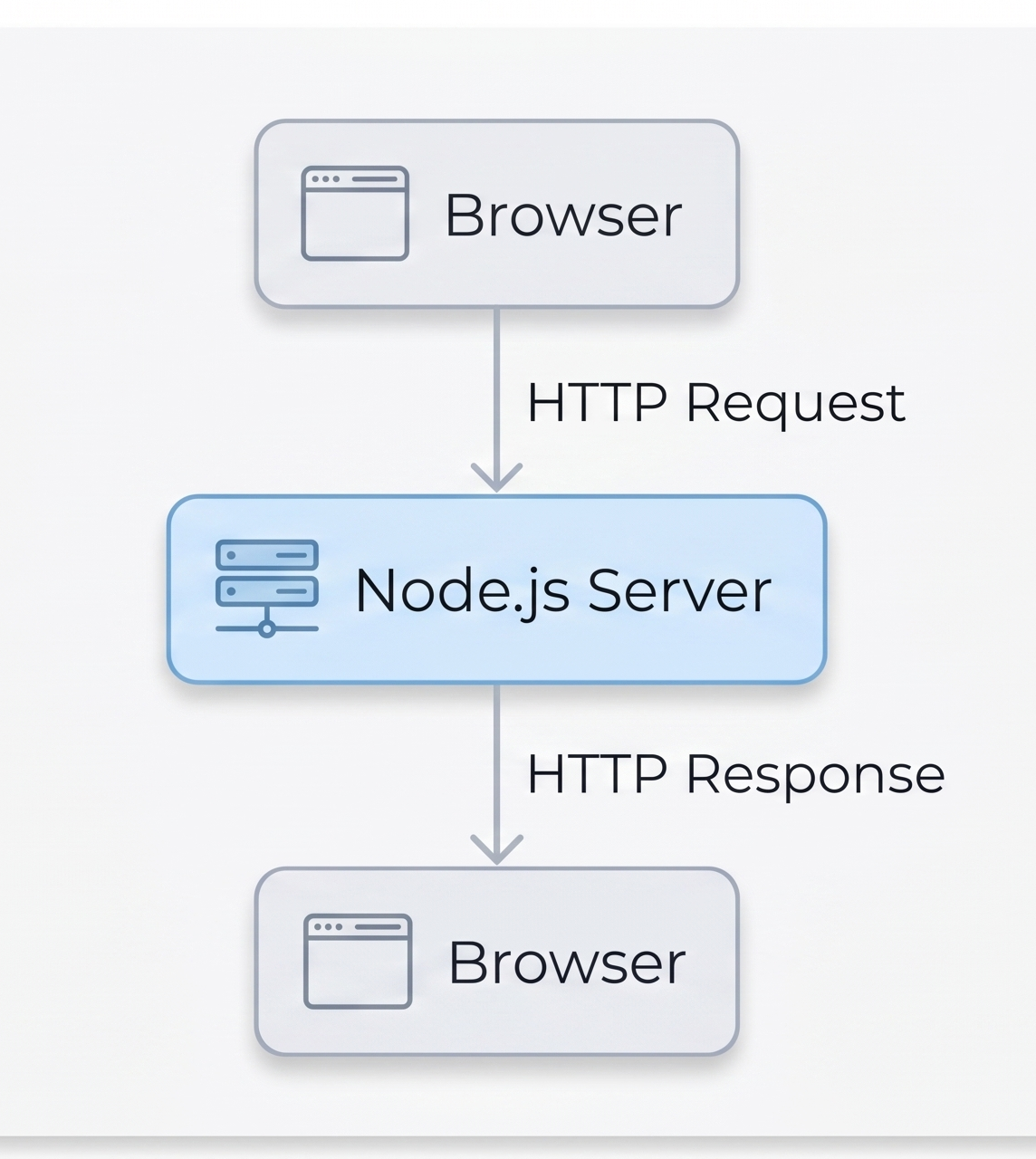
The basic idea is:
The client asks. The server answers.
Part 3 --- Client and Server
For example:
http://localhost:3000The browser is the client and your Node.js application is the server.
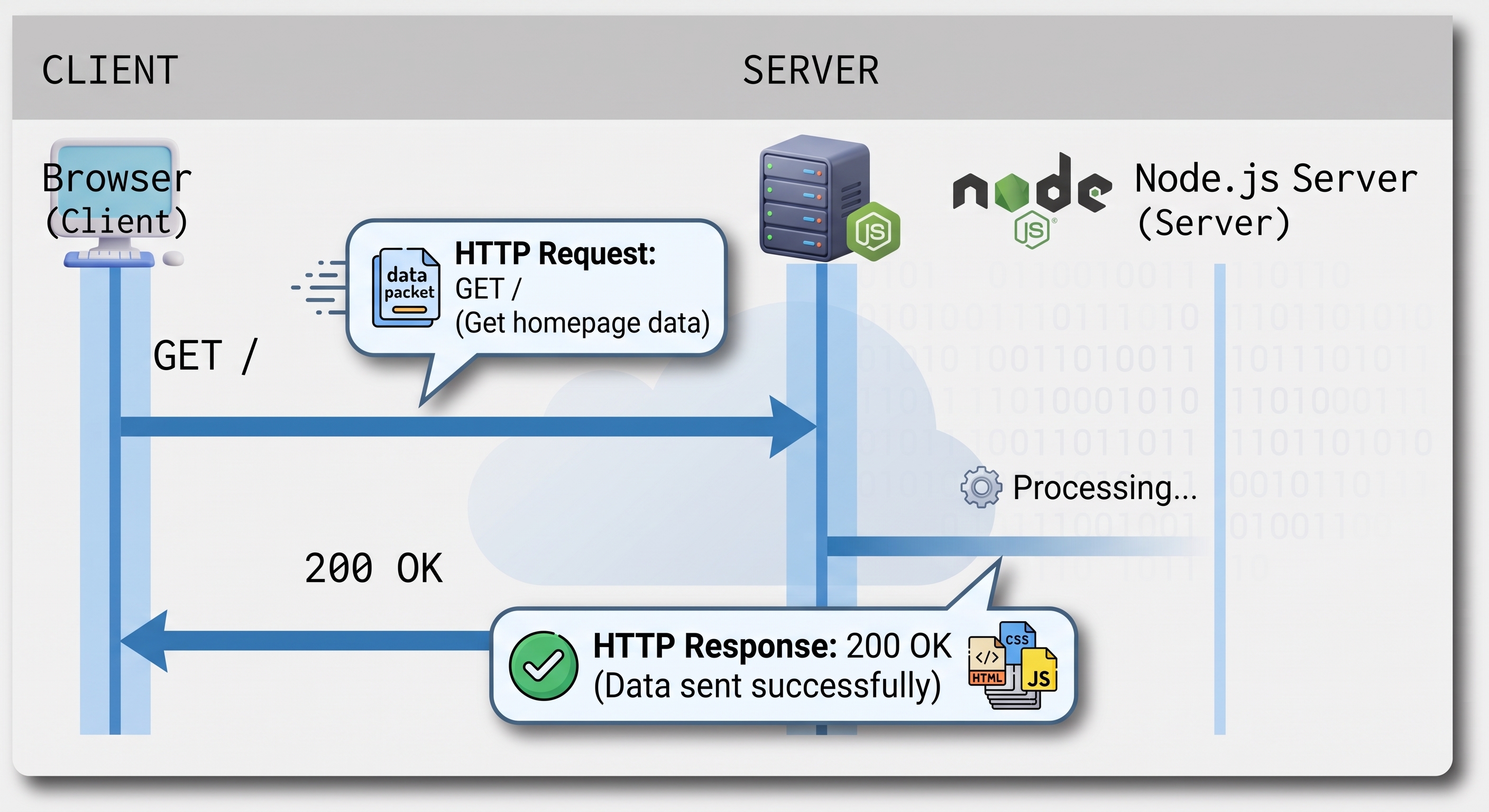
The client sends a request.
The server sends a response.
Part 4 --- HTTP Request
An HTTP request is a message sent by a client to a server.
A simplified request:
GET /hello HTTP/1.1
Host: localhost:3000
A request can contain:
- HTTP method
- URL/path
- Headers
- Request body
HTTP Method
The method tells the server what the client wants to do.
Common methods:
GET
POST
PUT
PATCH
DELETE
URL / Path
The path identifies the resource.
Examples:
/users
/products
/users/1
Headers
Headers provide additional information.
Example:
Content-Type: application/jsonRequest Body
The body contains data sent by the client.
Example:
{
  "name": "Alden",
  "email": "alden@example.com"
}
Request bodies are commonly used with POST, PUT, and PATCH.
Part 5 --- Common HTTP Methods
Method Common Purpose Example
GET Retrieve data GET /users POST Create data POST /users PUT Replace data PUT /users/1 PATCH Partially update PATCH /users/1 DELETE Delete data DELETE /users/1
Examples:
GET /usersmeans:
Give me the users.
POST /usersmeans:
Create a new user.
Part 6 --- HTTP Response
After receiving a request, the server sends a response.
Example:
HTTP/1.1 200 OK
Content-Type: application/json

{
  "message": "Hello World!"
}
A response commonly contains:
- Status code
- Headers
- Body
Part 7 --- HTTP Status Codes
Code Meaning Typical Use
 200 OK                      Successful request
 201 Created                 Resource created
 204 No Content              Successful operation without body
 400 Bad Request             Invalid client request
 401 Unauthorized            Authentication required
 403 Forbidden               Not allowed
 404 Not Found               Resource does not exist
 500 Internal Server Error   Server-side problem
Examples:
200 --- OK
GET /users
→ 200 OK
201 --- Created
POST /users
→ 201 Created
404 --- Not Found
GET /does-not-exist
→ 404 Not Found
Part 8 --- HTTP Headers
Headers provide additional information about a request or response.
For example:
Content-Type: application/jsonThis tells the client that the response contains JSON.
Common content types:
text/plain
application/json
text/html
In Node.js:
response.setHeader("Content-Type", "application/json");Part 9 --- Build Your First HTTP Server
Open:
src/index.tsReplace its contents with:
import http from "node:http";

const server = http.createServer((request, response) => {
  response.statusCode = 200;
  response.setHeader("Content-Type", "text/plain");

  response.end("Hello from Node.js!");
});

server.listen(3000, () => {
  console.log("Server running at http://localhost:3000");
});
Part 10 --- Run the Server
Run:
pnpm devYou should see:
Server running at http://localhost:3000Open:
http://localhost:3000Expected result:
Hello from Node.js!You created your first HTTP server!
Part 11 --- Understanding the Code
Import HTTP
import http from "node:http";Node.js provides a built-in HTTP module.
Create the Server
const server = http.createServer((request, response) => {The callback receives:
request  → information coming IN
response → information going OUT
Status Code
response.statusCode = 200;This means the request was successful.
Header
response.setHeader("Content-Type", "text/plain");This tells the client that we are returning plain text.
Response
response.end("Hello from Node.js!");This sends the response and ends it.
Listen
server.listen(3000, () => {
  console.log("Server running at http://localhost:3000");
});
The server listens on port 3000.
Part 12 --- localhost and Ports
When you visit:
http://localhost:3000localhost means your own computer.
3000 is the port where your application is listening.
Think of a port as a numbered door:
Your Computer
│
├── Port 3000 → Node.js Server
├── Port 3306 → MySQL
└── Other ports → Other applications
Part 13 --- Read the Request
Update your server:
import http from "node:http";

const server = http.createServer((request, response) => {
  console.log("Method:", request.method);
  console.log("URL:", request.url);

  response.statusCode = 200;
  response.setHeader("Content-Type", "text/plain");

  response.end("Hello from Node.js!");
});

server.listen(3000, () => {
  console.log("Server running at http://localhost:3000");
});
Run:
pnpm devVisit:
http://localhost:3000The terminal should show:
Method: GET
URL: /
Your browser sent:
GET /to the server.
Part 14 --- Create Different Routes
Replace src/index.ts with:
import http from "node:http";

const server = http.createServer((request, response) => {
  const url = request.url;

  response.setHeader("Content-Type", "text/plain");

  if (url === "/") {
    response.statusCode = 200;
    response.end("Welcome to my server!");
  } else if (url === "/hello") {
    response.statusCode = 200;
    response.end("Hello, Alden!");
  } else if (url === "/about") {
    response.statusCode = 200;
    response.end("This is the About page.");
  } else {
    response.statusCode = 404;
    response.end("Page not found.");
  }
});

server.listen(3000, () => {
  console.log("Server running at http://localhost:3000");
});
Test:
http://localhost:3000/
http://localhost:3000/hello
http://localhost:3000/about
http://localhost:3000/abc
The last URL should return a 404.
Part 15 --- Return JSON
APIs commonly return JSON.
Use:
import http from "node:http";

const server = http.createServer((request, response) => {
  const url = request.url;

  response.setHeader("Content-Type", "application/json");

  if (url === "/") {
    response.statusCode = 200;

    response.end(
      JSON.stringify({
        message: "Welcome to my API!"
      })
    );
  } else if (url === "/hello") {
    response.statusCode = 200;

    response.end(
      JSON.stringify({
        message: "Hello, Alden!"
      })
    );
  } else {
    response.statusCode = 404;

    response.end(
      JSON.stringify({
        message: "Route not found"
      })
    );
  }
});

server.listen(3000, () => {
  console.log("Server running at http://localhost:3000");
});
Visit:
http://localhost:3000/helloExpected response:
{
  "message": "Hello, Alden!"
}
Part 16 --- Why JSON.stringify()?
In TypeScript, we can create an object:
const user = {
  id: 1,
  name: "Alden"
};
We can convert it into JSON text using:
JSON.stringify(user)Result:
{"id":1,"name":"Alden"}Therefore:
response.end(
  JSON.stringify({
    message: "Hello"
  })
);
sends JSON data to the client.
Part 17 --- Build a Users Endpoint
Create a list of users:
const users = [
  {
    id: 1,
    name: "Alden"
  },
  {
    id: 2,
    name: "Juan"
  },
  {
    id: 3,
    name: "Maria"
  }
];
Complete example:
import http from "node:http";

const users = [
  {
    id: 1,
    name: "Alden"
  },
  {
    id: 2,
    name: "Juan"
  },
  {
    id: 3,
    name: "Maria"
  }
];

const server = http.createServer((request, response) => {
  const url = request.url;

  response.setHeader("Content-Type", "application/json");

  if (url === "/users") {
    response.statusCode = 200;

    response.end(
      JSON.stringify(users)
    );
  } else {
    response.statusCode = 404;

    response.end(
      JSON.stringify({
        message: "Route not found"
      })
    );
  }
});

server.listen(3000, () => {
  console.log("Server running at http://localhost:3000");
});
Visit:
http://localhost:3000/usersExpected:
[
  {
    "id": 1,
    "name": "Alden"
  },
  {
    "id": 2,
    "name": "Juan"
  },
  {
    "id": 3,
    "name": "Maria"
  }
]
Part 18 --- GET and POST
For a users API:
GET /usersmeans:
Retrieve users.
While:
POST /usersmeans:
Create a user.
The path can be the same while the method changes the meaning:
GET  /users → retrieve users
POST /users → create a user
We can check the method:
if (request.method === "GET") {
  // Handle GET
}

if (request.method === "POST") {
  // Handle POST
}
For example:
if (
  request.method === "GET" &&
  request.url === "/users"
) {
  // Return users
}
Part 19 --- API Mental Model
A basic API works like this:
Frontend / Browser
        │
        │ GET /users
        ▼
   Node.js API
        │
        │ Process request
        ▼
   HTTP Response
        │
        │ 200 OK
        │ application/json
        ▼
Frontend / Browser
Later, a database can be added:
Frontend
   │
   │ GET /users
   ▼
Node.js API
   │
   │ SQL Query
   ▼
Database
   │
   │ Users
   ▼
Node.js API
   │
   │ JSON
   ▼
Frontend
Part 20 --- Activity 1: Basic Routes
Create these routes:
Method URL Expected Response
GET / Welcome message GET /hello Hello World GET /about About information GET /users List of users GET /products List of products GET /unknown 404 response
For /products, return at least three products:
[
  {
    "id": 1,
    "name": "Laptop",
    "price": 50000
  },
  {
    "id": 2,
    "name": "Mouse",
    "price": 800
  },
  {
    "id": 3,
    "name": "Keyboard",
    "price": 1500
  }
]
Part 21 --- Activity 2: Status Codes
Make sure:
GET /usersreturns:
200An unknown route:
GET /somethingshould return:
404with:
{
  "message": "Route not found"
}
Part 22 --- Activity 3: HTTP Methods
Add method checking.
For /users:
GET /usersshould return the users.
For now, if another method is used, return:
{
  "message": "Method not allowed"
}
with status:
405Part 23 --- Challenge Activity: Batanes Tourism API
Create a simple API for a Batanes tourism system.
Create:
GET /destinations
GET /hotels
GET /restaurants
GET /activities
Example:
GET /destinationsResponse:
[
  {
    "id": 1,
    "name": "Basco Lighthouse",
    "location": "Basco"
  },
  {
    "id": 2,
    "name": "Marlboro Hills",
    "location": "Racuh a Payaman"
  }
]
You may create your own data.
Part 24 --- Debugging Checklist
If your server doesn't work:
1. Check Node.js
node -v2. Check pnpm
pnpm -v3. Check your project folder
Make sure your terminal is inside:
my-node-typescript-app4. Start the server
pnpm dev5. Open the correct URL
http://localhost:30006. Check the terminal
Look for errors such as:
Erroror:
EADDRINUSEPart 25 --- Knowledge Check
Choose the best answer.
1. What does HTTP stand for?
A. HyperText Transfer Protocol
B. High Transfer Text Protocol
C. Hyperlink Transmission Protocol
D. Host Transfer Technology
2. What is an HTTP request?
A. Information sent from server to client
B. Information sent from client to server
C. A database table
D. A JavaScript variable
3. What is an HTTP response?
A. Information sent from server to client
B. Information sent from client to server
C. A TypeScript interface
D. A database query
4. Which HTTP method is normally used to retrieve data?
A. POST
B. DELETE
C. GET
D. PATCH
5. Which method is commonly used to create a resource?
A. GET
B. POST
C. DELETE
D. HEAD
6. What does status code 200 mean?
A. Not Found
B. Server Error
C. Successful request
D. Unauthorized
7. What does status code 404 mean?
A. Created
B. Not Found
C. Successful
D. Forbidden
8. What is JSON commonly used for?
A. Formatting computer screens
B. Exchanging structured data
C. Compiling TypeScript
D. Starting Node.js
9. What does request.method provide?
A. The server's port
B. The HTTP method
C. The response body
D. The database name
10. What does request.url provide?
A. The requested URL/path
B. The response status
C. The server password
D. The database connection
Part 26 --- Short Answer Questions
Answer in your own words.
- What is the difference between an HTTP request and response?
- What is the purpose of an HTTP method?
- What is the difference between GET and POST?
- Why do APIs commonly return JSON?
- What does a 404 status code mean?
- What is the purpose of
Content-Type? - What is the purpose of port
3000? - What does
JSON.stringify()do?
Part 27 --- Key Takeaways
Remember:
HTTP
 │
 ├── Request
 │    ├── Method
 │    ├── URL
 │    ├── Headers
 │    └── Body
 │
 └── Response
      ├── Status Code
      ├── Headers
      └── Body
Important methods:
GET
POST
PUT
PATCH
DELETE
Important status codes:
200 → OK
201 → Created
204 → No Content
400 → Bad Request
401 → Unauthorized
403 → Forbidden
404 → Not Found
500 → Internal Server Error
Most importantly:
Request  = Client → Server
Response = Server → Client
Part 28 --- What's Next?
You now understand the basic mechanics of HTTP.
However, manually writing:
if (request.url === "/users") {
  // ...
}
becomes difficult as an application grows.
The next lesson introduces Express.
Instead of:
if (
  request.method === "GET" &&
  request.url === "/users"
) {
  // ...
}
Express allows:
app.get("/users", (request, response) => {
  // Return users
});
Then you can learn:
Node.js
   │
   └── Express
        │
        ├── Routes
        ├── Controllers
        ├── Middleware
        └── REST API
Later:
Reactjs Frontend
        │
        │ HTTP
        ▼
Node.js + Express API
        │
        │ Prisma
        ▼
      MySQL
Student Submission
Submit:
src/index.ts- Screenshot of your running server
- Screenshot of
/ - Screenshot of
/users - Screenshot of
/products - Screenshot of an unknown route showing
404 - Answers to the Knowledge Check
- Answers to the Short Answer Questions
- Completed Batanes Tourism API challenge
Suggested project:
http-requests-responses/
├── src/
│   └── index.ts
├── package.json
├── pnpm-lock.yaml
└── tsconfig.json
End of Student Handout